Get plugin

Don't use our dumb fucking SaaS to unfuck your AI footage.

Or do. We pretty much could care fucking less. (Or is it couldn't care less? Either fucking way.)

We built Halyard because we were balls-tired of round-tripping our bullshit 8-bit footage to who-knows-where to make it not look like eaten ass before it went to the colorist and VFX. So we took some mushrooms, topped up the vibe-code accounts and tried a bunch of shit. Some of it fucking worked pretty good and saved us a pain in the ass.

If you don't have shitty 8-bit color footage, this ain't for you. We're not here to teach you how to make banana bread if you don't like bananas.

Free to install. Free test credit. Prepaid credits when you need them. On Apple Silicon? Deband and Size (the Halyard UF Upscaler) can also run right on your Mac, inside the Premiere plugin: no upload, no credits, no sign-in needed. The plugin shows local time next to cloud time (and cloud cost), so you pick.
Screen recording, simplified: a clip is selected on track V1 of a sequence, Deband and HDR are ticked in the Halyard plugin, which quotes 2.05 credits for the 264-frame clip, Send is pressed, a progress bar fills, and the HDR result lands on track V2 directly above the original. dunes_spot · Sequence 01 Program: Sequence 01 00:00:14:06 HDR Sequence 01 00:00:0000:00:0800:00:1600:00:2400:00:3200:00:40 V2 V1 A1 A2 shot_01 shot_03 dunes_sunset_08 dunes_sunset_08_HDR HDR Halyard Halyard Connected Select clip(s) on the active sequence. Results land in a Halyard bin and on the timeline. Deband (8-bit → 12-bit ProRes XQ or 16-bit EXR) Strength2 — default HDR (SDR → HDR; slow, 8–30+ min) Runs together with Deband and/or Size. HighlightsConservative SpeedStandard Upscale (Lanczos / Halyard UF Upscaler) Place resultAbove the original ESTIMATED COST Estimate: 2.05 credits for 1 clip (264 frames at 24 fps) Deband0.18 HDR1.87 Placed above the original on V2 100% Send timeline 1 clip: Deband + HDR est. 2.05 credits

Same shot.
Cleaner pixels.
More to grade.

WHAT IT DOES · THREE SWITCHES

Our own stupid-ass custom trained model.

We built the debander and trained the rescaler ourselves, on a shit ton of legally ganked, openly licensed footage. Drag the frames. The left side is what you got. The right side is what you get back.

It's a Premiere Pro plugin plus a cloud service. Select clips, send them, and the results come back into your project as 12-bit ProRes 4444 XQ in LogC3 / AWG3, or as an ACEScg EXR sequence (half-float, 16-bit OpenEXR); HDR comes back the same way, as 12-bit ProRes 4444 XQ, and adds the ACEScg EXR sequence alongside it.

DEBAND

The Sky Defucker

It tells the banding to fuck off without softening the high-detail texture. Skies go smooth. Brick, hair and fabric stay sharp. Output is 12-bit ProRes 4444 XQ or a 16-bit ACEScg EXR, so the steps don't come back the second your colorist touches it. No grain, no look change.

8-bit in · 12-bit out
12-bit ProRes 4444 XQ · LogC3 / AWG3
or ACEScg EXR, half-float 16-bit
BEFORE · FLUX 3 · 8-BIT H.264 AFTER · DEBAND · 10-BIT
Before: a FLUX 3 video clip exactly as the generator delivered it (8-bit H.264). After: Halyard Deband, 10-bit (played here as dithered 8-bit H.264, the same decoder as the before). The open sky loses its steps; the cloud edges, the cirrus and the car stay as sharp as they were. The page shows the middle of the frame: open sky, cumulus, cirrus and the roof of the car; View full resolution shows all of it at 1:1.
SIZE

The Unfucked Upscaler

Custom trained on a shit ton of legally ganked, openly licensed footage. Two modes: Lanczos invents nothing at all, the Unfucked Upscaler (Halyard UF Upscaler in the plugin) generates more pixels based on the real detail that's already there. Never smaller than your source, never past 8K.

Why build a rescaler when there are a million good ones out there? Because we wanted one that works in the arbitrarily narrow-ass niche of generated 8-bit footage. Need to upres a Super 8 VHS transfer of dead Aunt Sally? Fuck off and go find an open-source model that'll do it better on your own damn computer.

Lanczos · Halyard UF Upscaler
HD · 2K DCI · UHD · 4K DCI · 5K · 6K · 8K UHD
Fit · Fill · Stretch
12-bit ProRes 4444 XQ · LogC3 / AWG3
BEFORE · 1920×800 SOURCE, BROWSER-SCALED AFTER · UF UPSCALER · 3840×1600
Real footage, real job. Before: the 8-bit 1920×800 input (H.264, 4 Mbps), scaled up by your browser, which is what an HD clip on a 4K timeline looks like. Processed by Halyard: Deband plus Size with the Halyard UF Upscaler at 2×, out at 3840×1600 (UHD width; the film is 2.40:1). Opens at 4× on the faces; Fit shows the whole frame. Tears of Steel © Blender Foundation, mango.blender.org, CC BY 3.0.
HDR

More Fucking Bit-Depth Detail HDR BETA

HDR is in beta: highlight detail above white is inferred from the 8-bit source, so check the result before delivery. We fucked with a bunch of the HDR model's constraints so it adds new detail in the highlights and the shadows while staying faithful to what's there. Want to fuck with it yourself? Be our guest. We've got sliders and everything. FYI, that shit gets expensive fast.

Only runs with Deband or Size. Here's why: don't fucking add hallucinated HDR detail to footage with 8-bit banding. That shit looks like ass.

LogC3 AWG3 ProRes 4444 XQ, 12-bit
plus an ACEScg EXR sequence, half-float 16-bit
BEFORE · SDR SOURCE AFTER · DEBAND + HDR · SHOWN IN SDR
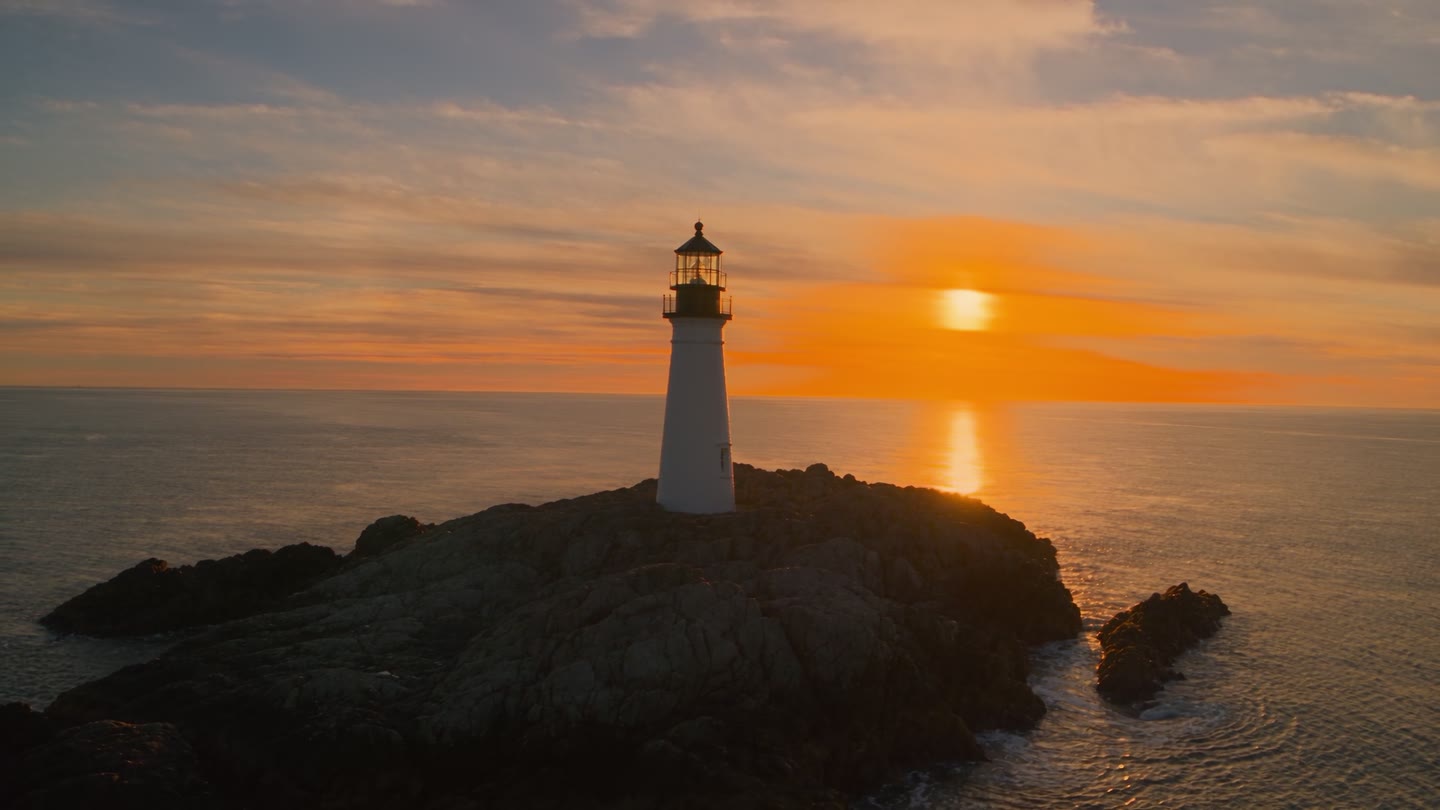
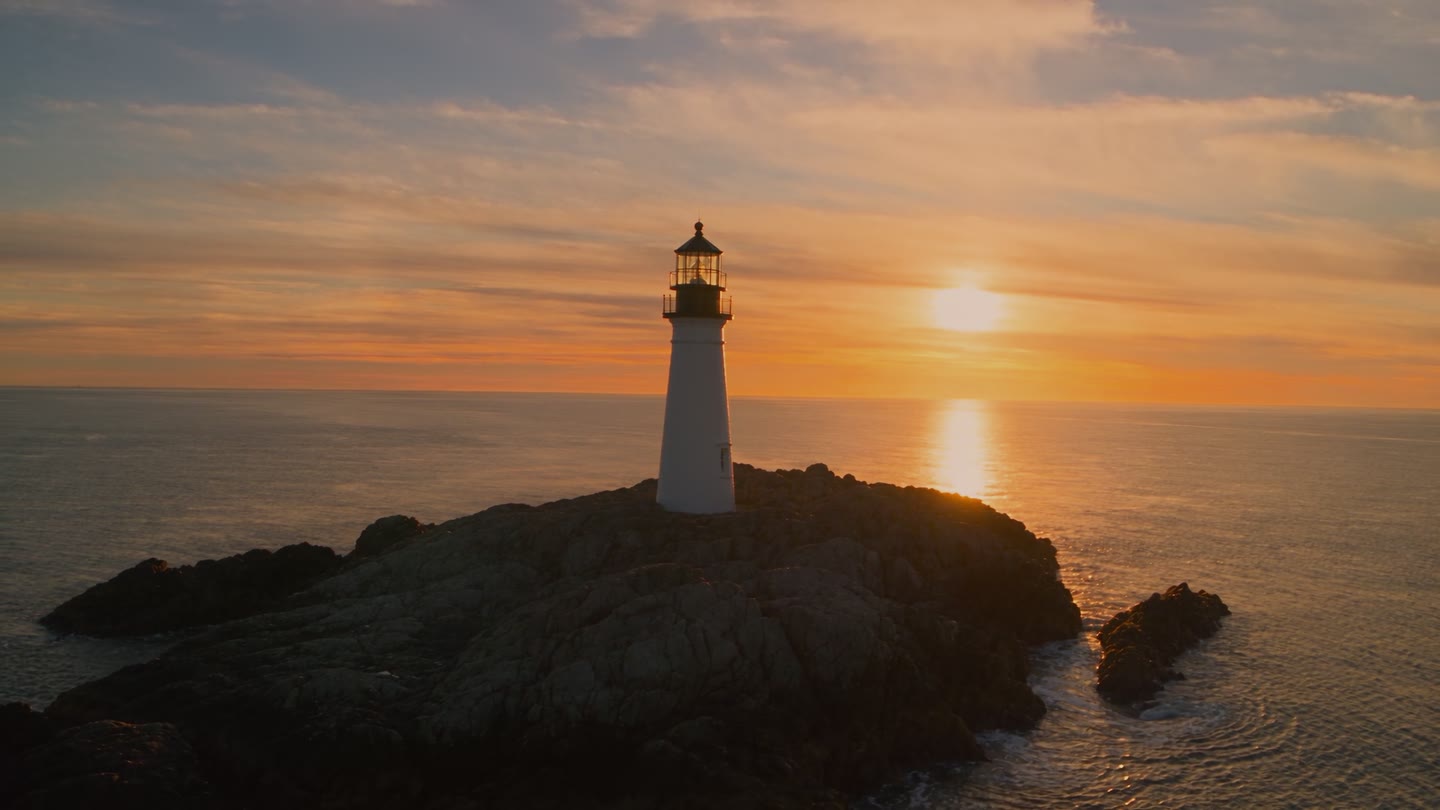
A real job on an AI-generated clip. Before: a 1920×1080 lighthouse at sunset, an 8-bit H.264 clip generated with Seedance, after Deband. Processed by Halyard: Deband plus HDR, highlights and shadows on Conservative, out as a 12-bit ProRes 4444 XQ master plus an ACEScg EXR sequence (shown here tone-mapped). On an SDR screen both sides go through the same tone curve: everything below the brightest highlights is left exactly as it is, and the range above it is compressed, so the two sides match except where the source clipped (the sun and the glow around it), where the after shows the sun's disc and the sky colour HDR rebuilt above white. That detail is inferred from the 8-bit source, not recovered camera data. On an HDR screen you can switch to HDR10 (peak 1,000 nits). The exposure control above pulls the SDR view brighter or darker, so you can see what the HDR rebuilt above and below it.
THE ACTUALLY COOL PART

Fix only the frames you fucking used.

Select the footage right on your Premiere timeline and render just that, with or without handles. You're not paying to fix a ton of dumb extra frames you already cut out.

Timeline or project selection · handles 0 to whatever you want · result lands above or replaces in place
V200:00:14:12 selected
source you didn't use
A042_C007.mov · in your cut
source you didn't use
rendered handles, if you want them never touched, never billed
THE REST OF THE PANEL

The boring shit that stops you losing a day.

Your file goes up as it is

No Media Encoder export, no pre-render, no waiting around. The plugin reads the original file off your disk and sends that. Generated clips are already files; there's nothing to flatten.

Results land in two places

A Halyard folder next to the source file, and a Halyard bin in your project. Send the same clip twice and the second one is _v2: an earlier result is never written over.

You see the bill of goods first

Before you send, a You'll get list per clip: every file coming back, its frame size, frame count, fps, color space, which track or bin it lands in, the estimate, and the day the server deletes it.

The queue doesn't forget

Close the plugin, open it later, and the Queue tab fills itself back from the server: anything still running, plus whatever finished in the last day, including jobs you sent from the CLI or the API. A failed row says whether you were charged and carries Retry and Copy diagnostics.

Place it where you want it

Above the original on the next free track, or replacing the original on its own track so your overlays still sit on top. One undo step either way.

EXR arrives as frames, not homework

An EXR job comes down as a tar; the plugin unpacks it and imports the sequence as numbered stills, named after its folder. Nothing for you to unzip or hand-conform.

Deband strength 1 / 2 / 3 · 12-bit ProRes 4444 XQ or half-float 16-bit ACEScg EXR · handles default 12 frames · one job per selected clip

For god's sake, why would you trust anyone with a fucked landing page like this?

Go fucking test it yourself. Yeah, it's only two bucks of credit, but what the fuck, we can't hold your hand the whole damn way. Did we mention you can feel free to just fuck off and not use it?

Free test credit: $2.00 for cloud renders sent from the Premiere plugin, on every new account. That's about 10 seconds of 1080p Deband + HDR, or 2 minutes of Deband on its own. The limits, plainly: one per account, you save a card first and it is not charged, the credit expires 14 days after it lands, and it only spends from the Premiere plugin, not from the CLI or the API. Rendering on your Mac is always free.
FOR SPEC-SHEET NERDS

The techie bullshit.

We're not going to show you a scoreboard, because we haven't run one. Nobody publishes frames you can check anyway. What we can tell you is what the other tools say about themselves, and what ours actually writes to disk.

ToolWhere it runsDebandingWhat it can hand a colorist
HalyardOur GPUs, driven from the Premiere plugin, the CLI or the APIA banding detector we trained, plus a reconstruction pass12-bit ProRes 4444 XQ or half-float 16-bit ACEScg EXR, LogC3 / AWG3
Topaz Video plugin
(After Effects, Resolve Studio)
Your own machineNo deband model in the plugin's documented list: Enhancement and Motion DeblurResolve Studio is required, and the plugin docs say the timeline resolution doesn't change at 2x or more
Topaz Labs cloud APITheir cloudNot in their documented models eitherFixed to bt709 8-bit YUV, so a LogC3 / AWG3 or PQ master can't survive the trip

On price, the one number we can line up: our HDR line is 10.20 credits a minute at 1080p and 40.80 credits at the 4K cap (1 credit = $1). Lightricks, whose LTX models our HDR is built on, lists its own API at $0.20 and $0.80 a second, which is $12.00 and $48.00 a minute. Our HDR line sits under the model vendor's own list price at both sizes.

There's no write-up to link yet. The before and after pairs up the page are the frames we'd put in one, and the free test runs on your own footage, which beats reading ours.
HEADLESS · CLI / API

Skip the old-ass editing software.

Don't want to fuck around in Premiere? Just want to automate your army of agents making fake UGC dreck? We made that easy as shit with a CLI and an API, and an MCP server is coming. Same switches, same prices, same credits.

But really, at that point why the fuck do you give a toss about color depth? Go make that AI hype-train money and ride this fucker into the ground.

  • Ask the price first. --quote prints the cost and exits. Nothing is uploaded, nothing is charged.
  • Retry without paying twice. Pass --idempotency-key (a repeat-safe id you choose) and the same key gives you back the same job instead of a second bill.
  • Take what you want. Every job can hand back the ProRes, the EXR sequence as a tar, an sRGB preview and a JSON color sidecar.
  • Big files don't choke. Anything over 64 MiB uploads in parts and each part retries on its own.
  • Keys you can kill. halyard keys create prints the key once, keys list shows when each was last used, keys revoke ends it. One balance across every key, the Premiere plugin included.
  • Nothing hides. Jobs you send from here show up in the plugin's queue, and jobs from the plugin show up in halyard jobs list.
The free test credit is the one thing a key can't spend: it only goes out on cloud renders sent from the Premiere plugin.
CLI
halyard run -i shot_001.mov --deband \
  --size basicvsrpp --preset uhd \
  --hdr --hdr-highlights conservative
API
POST /v1/jobs
{ "input_url": "s3://halyard-uploads/...",
  "pipeline_config": {
    "deband": { "name": "deband",
                "params": { "strength": 2 } },
    "upscale": { "name": "basicvsrpp",
                 "params": { "preset": "UHD (4K)",
                             "width": 3840, "height": 2160,
                             "aspect": "fit" } },
    "hdr": { "name": "ltx_hdr" } },
  "idempotency_key": "shot_001-v1" }
MCP (coming)halyard.deband · halyard.size · halyard.hdr · halyard.quote
You get back a job id, its status and the cost. Poll it, or let the CLI wait and download for you. MCP tool names are a sketch; that server isn't written yet. Get an API key
WHAT IT WON'T DO

We leave your footage alone as much as fucking possible.

  • No grain.
  • No look changes.
  • No regrade.
  • No new aesthetic.

You busted your balls making that footage, or at least that's what you tell yourself to sleep at night. Why the fuck would you let some tech bro fuckhead mess with it? We fix bit depth, banding and resolution and get out of the way. If you want something that invents detail wholesale, that's not us — go use Topaz for that.

PRICING · PREPAID CREDITS

H100s aren't free, fuckheads.

Priced per frame. Rates are in credits — one credit is one dollar. One balance for the plugin, CLI and API. Every send shows its cost first. If your balance won't cover it, it doesn't go, and nothing is charged.

SwitchCredits per minute of footage at 24 fpsNotes
Deband1.00 / min8-bit in, 12-bit ProRes 4444 XQ out. No grain, no look change.
Size: Lanczos+0.50 / minInvents nothing.
Size: Halyard UF Upscaler+1.50 / minThe Unfucked Upscaler.
HDR BETA10.20 / min at 1080p
40.80 / min at 4K
Beta. Only with Deband or Size. Scales with the source pixel count, up to 4x the 1080p rate.
HOW WE COUNT A MINUTE

A minute is 1,440 frames at 24 fps. After that, we bill by the frame.

60 fps footage has 2.5x the frames of 24 fps, so it costs 2.5x. No free lunch, fucknuts.

24 FPS1x
30 FPS1.25x
48 FPS2x
60 FPS2.5x

Not sure what a job will cost? The plugin shows the price before you send. The minimum charge is 0.50 credits per job.

TWO SPEEDS

Pick how fast you want it.

1

Grind

We throw it on the next free GPU and let that shit grind. It takes its bloody time. Cheapest way through.

Base rate. The prices above.
2

Rush

We get the fuck on with it. Your HDR job goes on the fastest datacenter GPUs we can grab. Fast enough to make a puppy cry. As you might guess, this one costs fucking more.

HDR only. 2x the HDR line. Called Fast in the plugin.
BUYING CREDITS

Credit packs

$25 · $100 · $500

One-off top-ups. One credit is one dollar.

Monthly plans

$25 · $100 · $500 / month

Get 30, 120 or 600 credits each month, 20% more than the pack. Plan credits expire after 60 days.

Free test credit

$2

On every new account.

Failed jobs

Refunded to your balance automatically. See Refunds for everything else.

The fine print

  • 1 credit = 1 US dollar. All prices are in USD.
  • Credits from packs expire 365 days after purchase.
  • Plan credits expire 60 days after each monthly grant. Plans renew monthly until cancelled. Cancelling stops future renewals at the end of the current period, and credits already granted keep their own expiry. You can hold one plan at a time.
  • The free test credit ($2 for new accounts) expires after 14 days and can only be spent on cloud renders sent from the Premiere plugin.
  • Credits are spent earliest-expiring first.
  • Jobs are charged per frame. Rates are per minute of footage at 24 fps, which is 1,440 frames. The minimum is 0.50 credits per job. The plugin shows the cost before you send, and a job your balance cannot cover is not sent and nothing is charged.
  • The final charge is re-measured on the actual frames after upload. Any difference is topped up or given back automatically. If your balance cannot cover a top-up, the job stops and is refunded in full.
  • Failed and cancelled jobs are refunded in full, automatically. Refunded credits return to the lots they came from. If that lot has expired meanwhile, the refunded amount gets a fresh 30-day expiry.
  • Expired credits are not refunded. Unused purchased pack credits can be refunded on request within 14 days of purchase (details on the Refunds page).
  • Prices are in US dollars and exclude taxes. Where we are required to collect sales tax or VAT, it is added at checkout.
INSTALL

It runs in Premiere because that's where we needed it.

Download the Premiere plugin
Private beta: email us and we send you the installerRequires Premiere Pro 26.2 or later, on an Apple Silicon MacAfter that the plugin updates itself: it checks for a new build, and checks the download's SHA-256 against the one the server published before it installs anything
On Apple Silicon and don't want the round trip at all? Deband and Size can run right there in the plugin, on your own Mac: no upload, no credits, no sign-in needed.
  1. 1Download the .ccx and double-click it. Creative Cloud installs it.
  2. 2Open the plugin: Window → UXP Plugins → Halyard. Dock it anywhere.
  3. 3Sign in with the email link the plugin sends you. Buy credits when you need them.
ON YOUR OWN MAC

Run it on your own damn Mac.

Deband and Size (the Halyard UF Upscaler) can run right inside the Premiere plugin, on your own Mac: no upload, no credits, no sign-in needed. The plugin shows you the local time next to the cloud time (and cloud cost), so you can pick whichever's faster or cheaper for that clip.

Export as ProRes 4444 with Maximum Bit Depth on and you get 12-bit out of the Deband pass. UHD frames get detected at their own size, in overlapping tiles that get stitched back together, so nothing shrinks your frame down first. Apple Silicon only, because that's what the Metal kernels and the Core ML detector run on.

The steps mostly stop being steps

On an 8-bit test ramp the biggest jump between neighbouring values was 7.06 10-bit codes. With the effect on, exported ProRes 4444 12-bit: 0.43. On a UHD ramp, 0.23. Measured in Premiere Pro 2026 on an M2 Pro.

And on actual generated clips

Real AI-generated 8-bit clips: measured banding steps went from 17.0 to 6.0 percent at 1080p, and 9.79 to 2.73 percent at UHD.

It leaves the rest alone

Outside the banded areas, luma moves by under 0.001 code on average. Same as the cloud version: no grain, no look change.

Fast enough to work in, mostly

On an M2 Pro, about 35 ms a 1080p frame and about 284 ms for a UHD one, so UHD is not real time. Your preview renders at preview size, about 16 to 18 ms at 960x540, which is the bit you actually sit and look at.

Two knobs and a cheat view

A Resize control with a few Methods, and a Banding Map view so you can see what it thinks is banded before you trust it.

The catch

Apple Silicon only: no Intel Macs, no Windows. We tuned it on AI-generated footage and haven't checked it on anything else. It ships inside the Premiere plugin, so there's nothing separate to install.

How local rendering works Built into the Premiere plugin · Premiere Pro 26.2 or later · Apple Silicon
ROADMAP, SORT OF

Premiere now. Resolve probably next.

We made it for Premiere, but we'll probably make a Resolve plugin too. Send us a note and maybe we'll hurry that shit up. Our VFX sup would be happy if we did.

I want it in Resolve
OR JUST WAIT

Patient? Fine with a repaint?

If you don't mind your footage getting repainted by a generative upscaler, one will probably show up native in some later version of Premiere.

Or just give us the cash now. Who knows what the fuck Adobe will charge you.

FULL DISCLOSURE

It's just another dumb fucking vibe-coded SaaS.

This was a bit of a pain in the ass, but you can probably build it yourself cheaper if you've got the time. We made it because we needed it, and thought: huh, if dumb fucks like us need it, maybe someone else does too.

Got a better idea for how to build this pipeline? Drop us a line. Fuck, maybe we'll hire you next time.

Hoist's one-shot prompt

It won't hand you our answers. You'll have to run the tests yourself, like we did. It took us a few weekends, not a lifetime.
Build a Premiere Pro panel that turns 8-bit, banded
AI-generated video into masters a colorist can grade.
Three switches: deband, upscale, SDR to HDR.
No grain. No look changes.

Do the hard part first. Research it, don't guess:
- Find or train a debander that kills banding on 8-bit
  AI footage without smearing texture. Test several.
  Most of them fail.
- Pick an upscaler that doesn't invent detail. Benchmark
  candidates on real closed-model footage, not stock clips.
- Find an HDR approach that stays faithful to the source.
  Work out when HDR should be allowed at all.
- Make sure 8-bit artifacts never reach the final master.

Then the boring part:
- A Premiere panel: send clips with handles, show the
  cost before sending, put results back on the timeline,
  keep a queue that survives the panel closing.
- A backend: GPU workers, prepaid credits, sign-in,
  receipts.
- Never train on customer footage.

Prove it. Same frame, same crop, before and after.
If it looks worse, it is worse.

Your footage stays yours.

We never use customer footage to train anything. Uploads are deleted 2 days after they land, results 7 days after a job finishes, and job records after 90 days. All automatic.

Read the no-training commitmentRetentionSubprocessors

Premiere Pro plugin · cloud service

Fix banding in your 8-bit AI footage.

Deband, Size and HDR for banded, generated video. No grain, no look changes. Results come back into your Premiere project as 12-bit ProRes 4444 XQ or ACEScg EXR.

Download the Premiere plugin See pricing
New accounts get $2.00 of free test credit. On Apple Silicon, Deband and Size can also run locally, right inside the Premiere plugin: no upload, no credits, no sign-in needed.
FLUX 3 dunes · Deband
BEFORE · FLUX 3 · 8-BIT AFTER · DEBANDED · 10-BIT
Before: a FLUX 3 video clip exactly as the generator delivered it (8-bit H.264). After: Halyard Deband, 10-bit (played here as dithered 8-bit H.264, the same decoder as the before). The open sky loses its steps; the cloud edges, the cirrus and the car stay as sharp as they were. The page shows the middle of the frame: open sky, cumulus, cirrus and the roof of the car; View full resolution shows all of it at 1:1.
Works where you already work
Premiere ProDaVinci Resolve (requested)CLI · REST API · MCP (coming)
0
grain added. No texture, no look changes.
7 days
then your results are deleted. Uploads go after 2 days.
0
customer footage used to train anything.
Product

Three switches. Nothing else.

The debander is built in-house, and the Halyard UF Upscaler is trained on openly licensed footage. Never on customer footage. Turn on what the shot needs. Everything else stays the way you made it.

Deband

Removes banding without softening texture. 8-bit in, 12-bit ProRes 4444 XQ out, so 8-bit artifacts stay out of everything downstream.

Size

Two modes. Lanczos invents nothing at all. The Halyard UF Upscaler generates more pixels based on the real detail already there. Never smaller than the source, never past 8K.

HDR BETA

SDR to HDR with more bit depth, not hallucinated highlights. Only available with Deband or Size, because HDR on top of 8-bit banding only gives you banded HDR. Adds an ACEScg EXR sequence (half-float, 16-bit). Highlight detail above white is inferred from the 8-bit source, so check the result before delivery.

Tears of Steel · Deband + Size
BEFORE · 1920×800 SOURCE AFTER · UF UPSCALER · 3840×1600
Before: the 8-bit 1920×800 input, scaled up by the browser (an HD clip on a 4K timeline). Processed by Halyard: Deband plus Size, Halyard UF Upscaler 2× to 3840×1600. Opens at 4× on the faces. Tears of Steel © Blender Foundation, mango.blender.org, CC BY 3.0.
Lighthouse sunset · Deband + HDR
BEFORE · SDR SOURCE AFTER · HDR · SHOWN IN SDR
Before: an 8-bit H.264 lighthouse at sunset, generated with Seedance, after Deband. Processed by Halyard: Deband plus HDR (highlights and shadows Conservative). Both sides go through the same SDR tone curve, so they match except around the clipped sun, where the after shows the disc and sky colour HDR rebuilt above white. HDR10 is offered on HDR screens. The exposure control steps through the same clip brighter or darker.
Timeline selection

Fix only the frames you used.

Select footage on your Premiere timeline and render just that, with or without handles. You aren't paying to fix frames you already cut.

unused
A042_C007.mov · in your cut
unused
■ rendered■ handles, if you want them□ never touched, never billed
In the plugin

The parts that save you a day.

No export step

The plugin uploads the original media file from your disk. No Media Encoder export, no pre-render before a job can start.

Results come back organised

Into a Halyard folder beside the source and a Halyard bin in your project. Repeat sends are versioned (_v2), so an earlier result is never overwritten. EXR jobs are unpacked and imported as numbered stills.

You'll get, before you send

Per clip: every deliverable, frame size, frame count, fps, color space, where it lands, the estimate, and the date the server deletes it.

One queue for every surface

Reopen the plugin and the Queue tab refills from the server: running jobs plus anything that finished in the last day, including jobs sent from the CLI or API. Failed rows show whether they were charged, with Retry and Copy diagnostics. Cancel stops a job from here.

Placement is your call

Above the original on the next free track, or replacing it on its own track so overlays above still apply. One undo step either way. Handles default to 12 frames a side.

Account, in the plugin

Balance, credit packs and plans, usage per job, API keys and notices. Sign in with the link the plugin emails you; the update banner handles new builds and checks the download's SHA-256 first.

Local

Local rendering, inside the plugin.

Deband and Size (the Halyard UF Upscaler) can run locally on the editor's Mac, right inside the Premiere plugin: no upload, no credits and no sign-in needed. The plugin shows local time next to cloud time (and cloud cost), so you can pick whichever is faster or cheaper for that clip. Apple Silicon only.

What runs locally

The banding detector and reconstruction pass, on the Mac itself, using Metal kernels and a Core ML detector. Exporting ProRes 4444 or 4444 XQ with Maximum Bit Depth on gives a 12-bit result.

UHD at native size

Frames up to 1920 wide are detected in one pass. Wider frames, including UHD 3840x2160, are detected in overlapping native-size tiles and stitched, so the frame is not shrunk before detection.

Measured on an M2 Pro

On an 8-bit ramp exported as ProRes 4444 12-bit with Maximum Bit Depth on, the largest step between neighbouring values fell from 7.06 to 0.43 (10-bit codes); on a UHD ramp, to 0.23. On real AI-generated clips, banding steps fell from 17.0 to 6.0 percent at 1080p and from 9.79 to 2.73 percent at UHD. Luma outside the banded areas changes by under 0.001 code on average.

Speed

About 35 ms per 1080p frame, about 107 ms for 2560x1440 and about 284 ms for UHD, so UHD is not real time. The editing preview renders at preview size, about 16 to 18 ms at 960x540.

Controls

A Resize control with Method choices, and a Banding Map view. Tested in Premiere Pro 26.2 on an M2 Pro.

Requirements and limits

Apple Silicon only: no Intel Macs, no Windows. Requires the Premiere plugin, Premiere Pro 26.2 or later. Tuned on AI-generated footage; other sources have not been evaluated. UHD is not real time.

How local rendering works Built into the Premiere plugin · no separate install
Pricing

GPU time isn't free.

Grind: we put it on the next free GPU and let it take its time. Cheapest way through. These are the base rates.

Deband1.00credits per minute at 24 fps8-bit in, 12-bit ProRes 4444 XQ out.
Size+0.50credits per minute, Lanczos+1.50credits per minute, Halyard UF Upscaler
HDRBETA · WITH DEBAND OR SIZE10.20credits per minute at 1080p, scaled by source pixels up to 4x (40.80 at 4K)Fast: 2x the HDR line.
A minute is 1,440 frames at 24 fps.
Past that we bill by the frame. 60 fps footage has 2.5x the frames of 24 fps, so it costs 2.5x. Minimum charge 0.50 credits per job.
24 fps · 1x30 fps · 1.25x48 fps · 2x60 fps · 2.5x
Credit packs$25 · $100 · $500One credit is one dollar.
Monthly plans$25 · $100 · $500 / month30, 120 or 600 credits each month. Plan credits expire after 60 days.
Free test credit$2of credit on every new account.
Rates are in credits — one credit is one dollar. Prepaid credits. Every send shows its cost first. If your balance won't cover it, it doesn't go and nothing is charged. Failed jobs are refunded automatically. Refund policy.

The fine print

  • 1 credit = 1 US dollar. All prices are in USD.
  • Credits from packs expire 365 days after purchase.
  • Plan credits expire 60 days after each monthly grant. Plans renew monthly until cancelled. Cancelling stops future renewals at the end of the current period, and credits already granted keep their own expiry. You can hold one plan at a time.
  • The free test credit ($2 for new accounts) expires after 14 days and can only be spent on cloud renders sent from the Premiere plugin.
  • Credits are spent earliest-expiring first.
  • Jobs are charged per frame. Rates are per minute of footage at 24 fps, which is 1,440 frames. The minimum is 0.50 credits per job. The plugin shows the cost before you send, and a job your balance cannot cover is not sent and nothing is charged.
  • The final charge is re-measured on the actual frames after upload. Any difference is topped up or given back automatically. If your balance cannot cover a top-up, the job stops and is refunded in full.
  • Failed and cancelled jobs are refunded in full, automatically. Refunded credits return to the lots they came from. If that lot has expired meanwhile, the refunded amount gets a fresh 30-day expiry.
  • Expired credits are not refunded. Unused purchased pack credits can be refunded on request within 14 days of purchase (details on the Refunds page).
  • Prices are in US dollars and exclude taxes. Where we are required to collect sales tax or VAT, it is added at checkout.
Developers

Skip the editing software.

CLI and API, same switches and the same balance as the plugin. MCP is coming. Point your agents at it and automate the whole thing.

  • --quote prices a job and exits without uploading or charging.
  • --idempotency-key (a repeat-safe id you choose) makes a retry return the first job instead of a second charge.
  • Deliverables per job: ProRes, the EXR sequence as a tar, an sRGB preview, a JSON color sidecar. Past its retention window a deliverable is reported as expired rather than handed to you as a dead link.
  • Uploads above 64 MiB go up in parts, retried per part.
  • API keys: create (shown once), list with last use, revoke. One balance across all of them; only the Premiere plugin can spend the free test credit.
  • Jobs sent here appear in the plugin's queue, and the other way round.
Get an API key
$ halyard run -i shot_001.mov --deband \
    --size basicvsrpp --preset uhd --hdr
POST /v1/jobs
{ "input_url": "s3://halyard-uploads/...",
  "pipeline_config": {
    "deband": { "name": "deband", "params": { "strength": 2 } },
    "upscale": { "name": "basicvsrpp",
                 "params": { "preset": "UHD (4K)", "width": 3840,
                             "height": 2160, "aspect": "fit" } },
    "hdr": { "name": "ltx_hdr" } },
  "idempotency_key": "shot_001-v1" }
Returns the job id, its status and the cost.

Questions

No. No grain, no texture, no look changes. If you want grain, add it in your grade.

Go test it yourself.

$2.00 of free test credit on a new account. About 10 seconds of 1080p Deband + HDR, or 2 minutes of Deband. One per account, after you save a card that we don't charge; it expires in 14 days and spends only on cloud renders from the Premiere plugin.

Download the Premiere plugin Also on Apple Silicon: Deband and Size can run locally, right inside the plugin on your own Mac, with no upload and no credits.